What is Model ContextProtocol (MCP)?
The Standard That Connects AI Models with Real-World Applications
Why This Matters
Every business depends on connecting AI models with real-world tools, data, and applications. Whether it is searching a database, sending an email, generating a report, or querying a CRM, AI needs a reliable way to access and interact with external systems.
Yet most organizations still build custom integrations for each AI platform. This approach is slow, hard to maintain, and vendor-specific. Each new AI model or tool requires repeated development effort, and scaling becomes a challenge.
Model Context Protocol (MCP) changes this. MCP is an open standard that provides a unified, consistent protocol for AI models to securely connect with external tools, data sources, and business applications — once and for all.
What Is Model Context Protocol (MCP)?
MCP is an open standard that enables AI models to securely connect with external tools, data sources, and business applications through a unified and consistent protocol.
Unlike custom integrations that require building separate APIs for each AI platform, MCP provides a vendor-neutral, standardized way for AI to discover and use tools across different systems and environments.
MCP enables AI models to:
Traditional Integrations vs MCP
| Feature | Traditional Integrations | MCP |
|---|---|---|
| Integration | Custom API for each AI | One standard protocol |
| Maintenance | Hard to maintain | Easier maintenance |
| Vendor | Vendor-specific | Vendor-neutral |
| Development | Repeated development | Reusable integrations |
| Scalability | Limited scalability | Enterprise-ready |
MCP is a significant evolution beyond traditional custom integrations for AI systems.
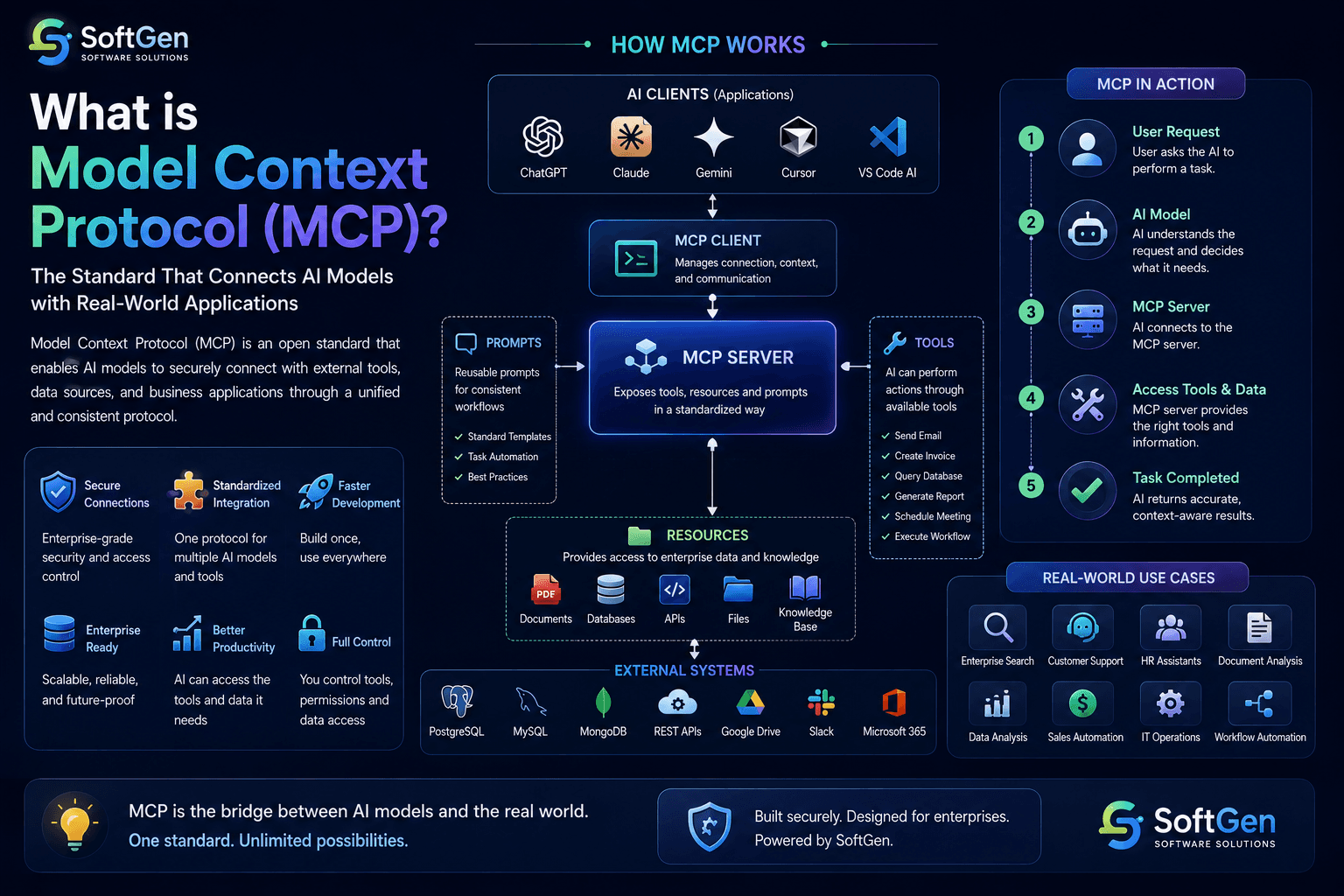
How MCP Works
MCP connects AI models with business tools through a standardized, secure, and scalable protocol.
Free MCP Architecture Consultation
Connect Your AI Models with Real-World Systems
Our AI team will analyze your integration landscape, design an MCP architecture, and recommend the best approach for connecting your AI models with business tools — completely free.
Core Components of MCP
AI Client
The AI client is the application that interacts with the user. Examples include ChatGPT, Claude Desktop, Gemini, Cursor, Windsurf, and VS Code AI Extensions. The client sends requests through MCP.
MCP Server
The MCP Server exposes tools, resources, and actions in a standardized way. Think of it as a bridge between AI and your business systems.
Tools
Tools allow AI to perform actions. Examples include Send Email, Create Invoice, Query Database, Generate Report, Schedule Meeting, Upload File, and Execute Workflow.
Resources
Resources provide information to the AI. Examples include PDFs, Company Policies, Documentation, Wikis, Knowledge Bases, Product Catalogs, and Customer Records.
Prompts
MCP also supports reusable prompts that help AI perform tasks consistently. These prompts can standardize workflows across teams and ensure reliable outcomes.
Real-World Business Use Cases
- Knowledge retrieval
- Document search
- Policy lookup
- Data analysis
- Cross-system queries
- Ticket resolution
- Account inquiries
- Order tracking
- Product information
- Escalation routing
- Employee onboarding
- Leave management
- Policy queries
- Training access
- Performance data
- Patient records
- Appointment scheduling
- Prescription data
- Insurance verification
- Clinical documentation
- Financial reporting
- Invoice processing
- Budget queries
- Compliance checks
- Audit trails
- System monitoring
- Deployment automation
- Incident management
- Infrastructure queries
- Log analysis
Benefits of MCP
Technologies Behind MCP
Common Challenges
Implementing MCP successfully requires addressing several challenges.
- ×Authentication complexity
- ×Permission management
- ×Server versioning
- ×Error handling
- ×Latency overhead
- ×Tool discovery
- ×Input validation
These challenges can be addressed through proper MCP architecture, testing, and continuous improvement.
Best Practices
- Expose only required tools
- Apply least-privilege permissions
- Validate tool inputs
- Audit AI activity
- Secure authentication
- Monitor tool usage
- Version your MCP servers
- Document available resources
Why Choose SoftGen?
At SoftGen, we design and build MCP-powered AI integration solutions tailored to your business.
We help organizations connect AI models with real-world business systems, build enterprise-ready AI solutions, and scale their operations with MCP.
Final Thoughts
MCP is an open standard that enables AI models to securely connect with external tools, data sources, and business applications through a unified and consistent protocol.
By providing a vendor-neutral, standardized approach to AI integration, MCP simplifies development, improves scalability, enhances security, and enables AI systems to interact with real-world business applications.
Organizations that adopt MCP today will be better equipped to build enterprise-ready AI solutions, connect with multiple AI platforms, and stay competitive in the rapidly evolving AI landscape.
Frequently Asked Questions
What does MCP stand for?
MCP stands for Model Context Protocol, an open standard that allows AI models to securely connect with external tools, resources, and business systems.
Is MCP only for one AI model?
No. MCP is vendor-neutral and can be used with multiple AI platforms that support the protocol.
Does MCP replace APIs?
No. MCP works on top of existing APIs, providing a standardized way for AI models to discover and use them.
Is MCP important for enterprise AI?
Yes. MCP simplifies integrations, improves scalability, enhances security, and enables AI systems to interact with real-world business applications in a consistent way.
Ready to Build Your MCP Integration?
Let's connect your AI models with real-world business systems
Whether you are building MCP servers, connecting AI with CRMs, ERPs, or databases, or designing a multi-agent AI architecture, SoftGen can help you design and develop secure, scalable, and enterprise-ready MCP solutions tailored to your business.